Maclear is introducing a faster way to fund your account — the instant deposits feature.
The feature gives every investor a personal virtual IBAN, which is a dedicated EUR bank account generated once and permanently linked to your Maclear profile. Powered by our partner Keytom, it lets you top up your Maclear balance by regular bank transfer, with funds arriving within 2 minutes of leaving your bank. Deposit fees remain 0%, as always.
This guide walks through the full user flow — what to click, what you'll see at each step, and what happens after each action.
In This Article
How to get started
Open Deposit/Withdraw
Go to the Deposit/Withdraw tab in your Maclear account and click the Instant deposit button.
Instant deposit button
Agree to data transfer
A prompt will appear — click Agree & get. The bank will review your data and prepare your payment details within 5 minutes.
Click Agree & get
Wait for approval
Usually it takes up to 5 minutes. You'll see Request received — this means it's being processed.
Request received
Once approved, the status changes to Request has been approved.
Request has been approved
If you see Request not approved, contact [email protected] — the team will help.
Request not approved
Copy your virtual IBAN
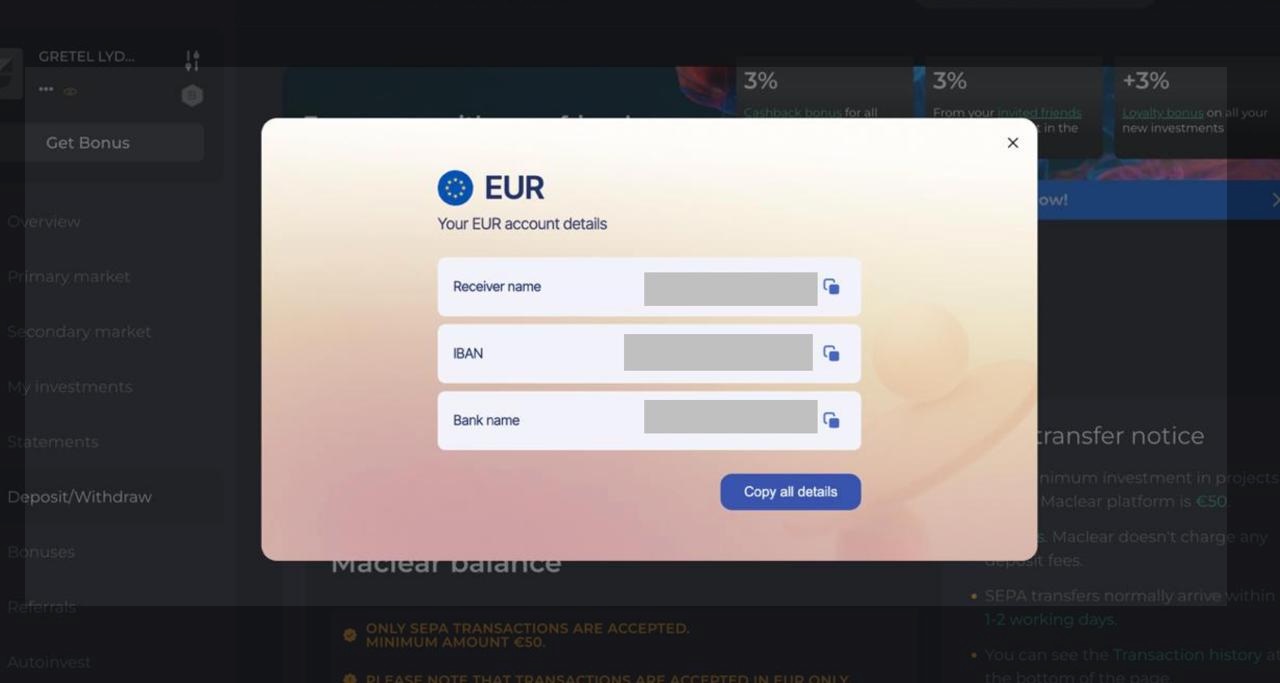
Click Instant deposit again — your personal EUR account details will appear. Copy the Receiver name, IBAN, and Bank name to use for all future deposits.
Your personal EUR account details
For every transfer, remember:
Include your Maclear account number in the payment description — you'll see it pre-filled as "Deposit to account No. XXXXXX"
Send from a bank account registered under the same name as your Maclear account — names must match exactly (AML requirement). Name changed recently? Contact [email protected] before sending a transfer.
This feature is currently in testing. Try it out and let us know how it goes — your feedback shapes what we build next. Feel free to reach out to [email protected].